
Giỏ hàng
0 Sản Phẩm

2.197.455₫
32MB Cache
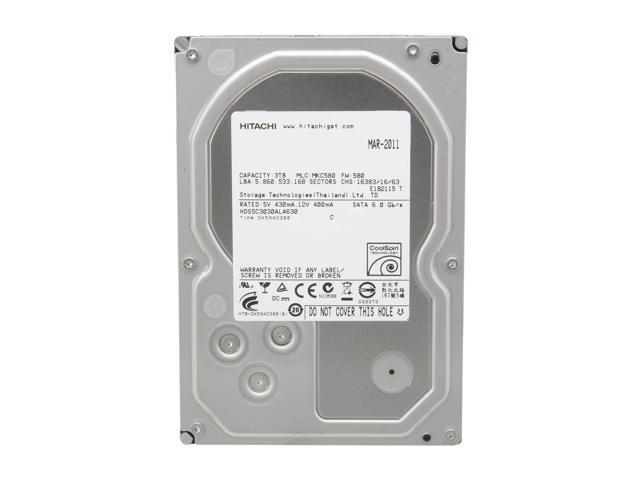
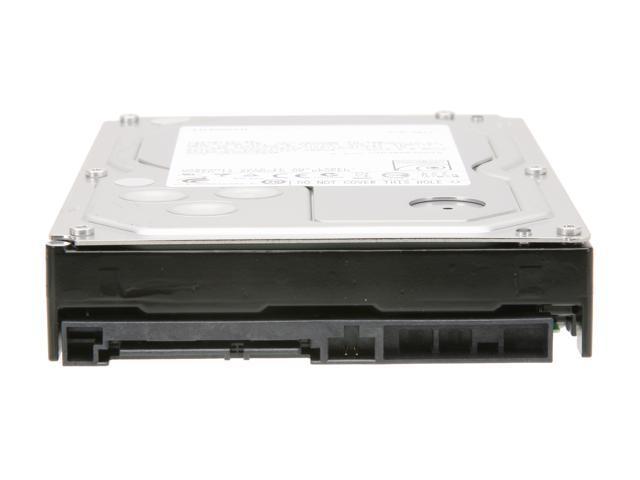
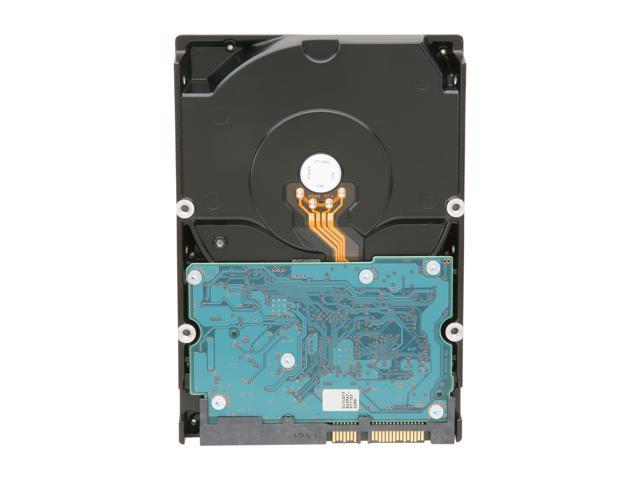
SATA 6.0Gb/s 3TB
| Brand | Hitachi GST |
|---|---|
| Series | Deskstar 5K3000 |
| Model | HDS5C3030ALA630 (0F12460) |
| Packaging | Bare Drive |
| Interface Interface | SATA 6.0Gb/s |
|---|---|
| Capacity | 3TB |
| RPM RPM | 5700 RPM |
| Cache Cache | 32MB |
| Features | CoolSpin |
|---|---|
| Usage | For Daily Computing |
| Form Factor Form Factor | 3.5″ |
|---|
| Date First Available | June 18, 2016 |
|---|
Pros: 2.72 TB space; I got it when it was on sale for $130.
When you connect the drive to a windows 7 PC, it may show up either as 750GB hard drive or 2TB hard drive based on your motherboard. Please do the following;
First delete the drive(if you have formatted it to NTFS or shipped as NTFS) using windows disk management (right click my computer and click manage then click disk management) then, convert the hard drive to use the GUID partition or(GPT) disk partitioning system as listed below;
1) From windows 7 start- search program files — type DISKPART then enter;
2) At the DISKPART prompt, type—- list disk then enter; It lists all your hard drives; Make note of the disk number you want to convert.
3)At the DISKPART prompt, type—- select disk 0,1,2 etc (make sure put space before the number) then enter;
4) In the DISKPART utility, after selecting the drive you want to convert, enter the following command:CONVERT GPT then enter;
Done; 2.72TB will appear in my computer.
Cons: None from the drive.
Windows and MB limitations, so users should know how to format the drive to use as boot up or backup based on their UEFI BIOS motherboards.
Pros: When functional, was on-par performance wise with any of my 1.5TB-2TB drives.
Cons: After four months began having numerous bad blocks, hit the SMART failure thresholds, and transfer rate dropped to under 50kb/s. It took me a month at those rates, but at least I was able to recover my data, finally. It goes in for RMA tomorrow.
Overall Review: Shortest life-span I’ve had of any drive I’ve bought in the last ten years.
http://www.hitachigst.com/contact_support
Hitachi Technical Support Center
M-F 8AM to 6PM PST at 1.888.426.5214
Pros: This is my first Hitachi drive…Great capacity…but poor performance, and reliability. Got this drive oct 8th, and 2 days ago it vanished from my computer, after reboot it asked to be formated. Nothing I tried could bring it back to working status, so I formated….moved alll my media back on to it. And you would think that it would work ok, but 2 days later it died again.
Cons: Poor performance, one would expect the drive to last you at least 3 years without problems.
Overall Review: Called Hitachi to get it replaced, they told me that they would but I have to pay the shipping charges….wow…ok, great support. So when I get my drive back…most likely I will be selling it and never buying Hitachi again. I give they 2 stars for replacing the drive.
Pros: Drive arrived well packaged and worked as intended.
Cons: Click of Death less than 1 week.
Overall Review: After less than a week of operation the drive did the click of death.
Lucky for me I had a backup of the data.
Pros: Price
Cons: Failed after a couple months.
http://www.hitachigst.com/contact_support
Hitachi Technical Support Center
M-F 8AM to 6PM PST at 1.888.426.5214
Pros: 3TB yay!
Cons: I have 3 of these in my backup server and 2 of them have failed so far! It causes Server 2008 R2 to hang right before the login screen. There is something wrong with the boot sectors on these drives. Stay away. It also sucks that Hitachi has no advanced replacement. This means that you have to ship them the drive first and then they will send you another.
Overall Review: I would not buy this brand again.
Pros: huge size
works as advertized
low price (I got these at 119 a few months back)
5x3TB=a single 10.9TB (formatted in GUID in win7x64)
Cons: 5400 is slow nowdays. but for power savings and cool operation it’s still ok.
Overall Review: used an SPM393 (available elsewhere…get on this newegg! these ROCK) for hardware RAID5 through the standard onboard intel sata controler. if you use the four standard ports and four SPM393’s with 20 of these 5K3000’s you can have 44TB in a single tower!


NGUỒN HÀNG ĐẢM BẢO
Hàng hóa trên HQG.VN được bán bởi các các nhà cung cấp lớn và uy tín nhất thế giới.

GIÁ CẢ CẠNH TRANH
HQG.VN đem đến cơ hội mua sắm hàng hóa chất lượng quốc tế, giá Việt Nam cho tất cả mọi người.

GIAO HÀNG TOÀN QUỐC
HQG.VN giao hàng miễn phí tới tất cả 63 tỉnh thành trên toàn quốc.

THANH TOÁN THUẬN TIỆN
Hỗ trợ nhiều phương thức thanh toán. Được đảm bảo an toàn tuyệt đối bởi nganluong.vn

BẢO HÀNH SẢN PHẨM
HQG.VN có chính sách bảo hành chính hãng cho các sản phẩm

HỖ TRỢ 24/7
Tổng đài hỗ trợ: 028.7309.6999
Bảo hành 24/7: 1900636106

| Brand | Hitachi GST |
|---|---|
| Series | Deskstar 5K3000 |
| Model | HDS5C3030ALA630 (0F12460) |
| Packaging | Bare Drive |
| Interface Interface | SATA 6.0Gb/s |
|---|---|
| Capacity | 3TB |
| RPM RPM | 5700 RPM |
| Cache Cache | 32MB |
| Features | CoolSpin |
|---|---|
| Usage | For Daily Computing |
| Form Factor Form Factor | 3.5″ |
|---|
| Date First Available | June 18, 2016 |
|---|
Pros: Works as expected.
Cons: Partitions bigger then 2.2Tb requires special, not XP compatible, formatting.
Overall Review: I performed tests with HddScan.
Read: Go linearly from 128 to 60Mb/s. (screen shot 1)
Write: Go linearly from 220 to 80Mb/s. (screen shot 2)
Write on Sata II: As on Sata III, but beginning limited by 210Mb/s. (screen shot 3)
On SataI, read and write graphs was cut by 110MB/s. (no screen shot)
Butterfly (locally random): From 8 to 20Mb/s. (Took 4 days for such big disk.) (screen shot 4)
Conclusions:
1. Surprisingly for me, writing is twice faster the reading.
2. Except small area, there are no difference between SataII and SataIII connection for linear (ideal) writing. (On my SSD difference almost twice.)
3. For random access, disk used only 1/4 of SataI practical limitations.
4. It is bad idea to place system volume on this disk.
Pros: 2.72 TB space; I got it when it was on sale for $130.
When you connect the drive to a windows 7 PC, it may show up either as 750GB hard drive or 2TB hard drive based on your motherboard. Please do the following;
First delete the drive(if you have formatted it to NTFS or shipped as NTFS) using windows disk management (right click my computer and click manage then click disk management) then, convert the hard drive to use the GUID partition or(GPT) disk partitioning system as listed below;
1) From windows 7 start- search program files — type DISKPART then enter;
2) At the DISKPART prompt, type—- list disk then enter; It lists all your hard drives; Make note of the disk number you want to convert.
3)At the DISKPART prompt, type—- select disk 0,1,2 etc (make sure put space before the number) then enter;
4) In the DISKPART utility, after selecting the drive you want to convert, enter the following command:CONVERT GPT then enter;
Done; 2.72TB will appear in my computer.
Cons: None from the drive.
Windows and MB limitations, so users should know how to format the drive to use as boot up or backup based on their UEFI BIOS motherboards.
Pros: When functional, was on-par performance wise with any of my 1.5TB-2TB drives.
Cons: After four months began having numerous bad blocks, hit the SMART failure thresholds, and transfer rate dropped to under 50kb/s. It took me a month at those rates, but at least I was able to recover my data, finally. It goes in for RMA tomorrow.
Overall Review: Shortest life-span I’ve had of any drive I’ve bought in the last ten years.
http://www.hitachigst.com/contact_support
Hitachi Technical Support Center
M-F 8AM to 6PM PST at 1.888.426.5214
Pros: This is my first Hitachi drive…Great capacity…but poor performance, and reliability. Got this drive oct 8th, and 2 days ago it vanished from my computer, after reboot it asked to be formated. Nothing I tried could bring it back to working status, so I formated….moved alll my media back on to it. And you would think that it would work ok, but 2 days later it died again.
Cons: Poor performance, one would expect the drive to last you at least 3 years without problems.
Overall Review: Called Hitachi to get it replaced, they told me that they would but I have to pay the shipping charges….wow…ok, great support. So when I get my drive back…most likely I will be selling it and never buying Hitachi again. I give they 2 stars for replacing the drive.
Pros: Drive arrived well packaged and worked as intended.
Cons: Click of Death less than 1 week.
Overall Review: After less than a week of operation the drive did the click of death.
Lucky for me I had a backup of the data.
Pros: Price
Cons: Failed after a couple months.
http://www.hitachigst.com/contact_support
Hitachi Technical Support Center
M-F 8AM to 6PM PST at 1.888.426.5214
Pros: 3TB yay!
Cons: I have 3 of these in my backup server and 2 of them have failed so far! It causes Server 2008 R2 to hang right before the login screen. There is something wrong with the boot sectors on these drives. Stay away. It also sucks that Hitachi has no advanced replacement. This means that you have to ship them the drive first and then they will send you another.
Overall Review: I would not buy this brand again.
Pros: huge size
works as advertized
low price (I got these at 119 a few months back)
5x3TB=a single 10.9TB (formatted in GUID in win7x64)
Cons: 5400 is slow nowdays. but for power savings and cool operation it’s still ok.
Overall Review: used an SPM393 (available elsewhere…get on this newegg! these ROCK) for hardware RAID5 through the standard onboard intel sata controler. if you use the four standard ports and four SPM393’s with 20 of these 5K3000’s you can have 44TB in a single tower!


Pros: Works as expected.
Cons: Partitions bigger then 2.2Tb requires special, not XP compatible, formatting.
Overall Review: I performed tests with HddScan.
Read: Go linearly from 128 to 60Mb/s. (screen shot 1)
Write: Go linearly from 220 to 80Mb/s. (screen shot 2)
Write on Sata II: As on Sata III, but beginning limited by 210Mb/s. (screen shot 3)
On SataI, read and write graphs was cut by 110MB/s. (no screen shot)
Butterfly (locally random): From 8 to 20Mb/s. (Took 4 days for such big disk.) (screen shot 4)
Conclusions:
1. Surprisingly for me, writing is twice faster the reading.
2. Except small area, there are no difference between SataII and SataIII connection for linear (ideal) writing. (On my SSD difference almost twice.)
3. For random access, disk used only 1/4 of SataI practical limitations.
4. It is bad idea to place system volume on this disk.